
For the process_data
argument. It converts continuous
indicator variable to ordinal variables.
Usage
ordinal_variables(data, cut_patterns = NULL, cuts = NULL)

cut_patterns(which = NULL)

plot_cut_pattern(which, ...)

plot_all_cut_patterns(..., mar = c(3, 1, 2, 1))
Arguments
- data
A data frame.
- cut_patterns
A named vector. The names are the names of the latent variables for which indicator scores will be converted. Each value must be the name of one of the built-in patterns (call
cut_patterns()to list the patterns and their names). Can be used withcutsbut a latent variable should appear only either incut_patternsorcuts, not both. If bothcut_patternsandcutsare set toNULL, then the original data (data) will be returned unchanged.- cuts
A named list. The names are the names of the latent variables for which indicator scores will be converted. Each element is a vector of the thresholds for the conversion.
-InfandInfwill be automatically included during the conversion. Can be used withcut_patternsbut a latent variable should appear only either incut_patternsorcuts, not both. If bothcut_patternsandcutsare set toNULL, then the original data (data) will be returned unchanged.- which
A name of a built-in pattern.
- ...
Optional arguments to be passed to
barplot().- mar
A vector of four numbers, for the margin of each plot: bottom, left, top, right. See
par().
Value
The function ordinal_variables()
returns a data frame with the
the converted scores.
The function cut_patterns()
returns a named list of the built-in
patterns if which = NULL, and
a numeric vector of the thresholds
of a built-in pattern if which is
set to one of the names of the built-in
patterns.
The function plot_cut_pattern()
returns a numeric vector of the
thresholds of the built-in pattern
specified in which. It is called
for its side-effect, plotting the
pattern.
The function
plot_all_cut_patterns() returns
NULL invisibly. It is called for
its side-effect, plotting all the
built-in patterns.
Details
This function is to be used in
the process_data argument of
power4test().
It is used for converting the continuous indicator scores generated to ordinal scores (with values 1, 2, 3, etc.).
For example, if the cut points (thresholds) are -2 and 2, then sores will be converted to three categories: (-Inf to -2], (-2 to 2], and (2 to Inf]. The intervals are closed on the right. That is, a score of -2 is in the interval (-Inf to -2], not in the interval (-2 to 2).
The conversion is implemented by cut().
There are two ways to specify the
conversion. The first one is to use
some built-in thresholds, based on
Savalei and Rhemtulla (2013), Table 1.
Call cut_patterns() with no argument
to list all the built-in patterns
and their names.
Alternatively, users can specify the
thresholds directly through the argument
cuts.
Currently, all indicators of a latent variable must be converted in the same way.
The function plot_cut_pattern() can
be used to plot a pattern using
barplot().
The function
plot_all_cut_patterns() can be used
to plot all built-in patterns using
barplot() on a grid.
References
Savalei, V., & Rhemtulla, M. (2013). The performance of robust test statistics with categorical data. British Journal of Mathematical and Statistical Psychology, 66(2), 201–223. doi:10.1111/j.2044-8317.2012.02049.x
See also
power4test(). See also
cut() for the implementation.
Examples
# Specify the model
mod <-
"
m ~ x
y ~ m + x
"
# Specify the population values
mod_es <-
"
y ~ m: l
m ~ x: m
y ~ x: n
"
# Specify the numbers of indicators and reliability coefficients
k <- c(y = 3,
m = 4,
x = 5)
rel <- c(y = .70,
m = .70,
x = .70)
# Simulate the data
out <- power4test(
nrep = 2,
model = mod,
pop_es = mod_es,
n = 200,
number_of_indicators = k,
reliability = rel,
process_data = list(fun = "ordinal_variables",
args = list(cut_patterns = c(x = "s3"),
cuts = list(m = c(-2, 0, 2)))),
test_fun = test_parameters,
test_args = list(op = "~"),
parallel = FALSE,
iseed = 1234)
#> Recommend setting 'parallel' to TRUE for faster analysis
#> Simulate the data:
#> Fit the model(s):
#> Do the test(s): test_parameters: CIs (op: ~)
dat <- pool_sim_data(out)
head(dat, 50)
#> y1 y2 y3 m1 m2 m3 m4 x1 x2 x3 x4 x5
#> 1 0.01052630 -0.992532325 -1.12858280 1 1 2 2 1 2 1 3 2
#> 2 0.94959134 -0.550501576 0.71633641 4 2 2 2 2 2 2 2 1
#> 3 -0.86172905 0.369667531 -0.74777555 3 4 3 2 2 2 2 2 2
#> 4 0.16065430 0.930350881 0.04865838 1 2 2 2 2 2 1 2 2
#> 5 0.36428103 0.280704629 0.88255101 3 3 2 3 1 2 1 2 2
#> 6 0.47454562 1.193414924 -0.81892507 3 3 3 3 2 2 2 2 2
#> 7 1.84947779 0.192314739 1.72345307 3 3 3 2 2 1 2 2 3
#> 8 1.46300684 0.187227098 0.18509161 2 2 2 2 2 2 2 1 1
#> 9 -1.07128820 0.213832606 -0.71610120 2 2 2 2 2 2 2 2 2
#> 10 -0.16787023 -1.192830517 -0.59227042 2 3 2 2 1 2 2 2 2
#> 11 -0.52480153 0.538197321 0.90971320 2 3 2 2 1 1 2 2 2
#> 12 -0.47321651 -0.051951968 0.60136010 2 1 2 2 1 3 2 2 2
#> 13 0.90104149 0.065799515 -0.36006259 2 2 3 2 2 2 2 2 2
#> 14 -1.01343165 -1.692283852 -1.44158610 2 3 2 2 2 2 3 1 2
#> 15 -1.06075451 1.804756880 0.14617995 3 3 3 4 1 2 2 2 3
#> 16 -0.22584750 0.009541832 0.20346814 3 3 2 3 2 3 2 2 2
#> 17 1.01902557 -0.130757360 -0.46949887 3 3 3 2 3 2 2 2 3
#> 18 -0.56502372 -0.735528452 -2.45120322 3 2 3 2 2 2 2 2 2
#> 19 -1.01022070 -0.809507916 -0.59213953 3 3 2 2 2 2 3 2 3
#> 20 0.64497818 0.441692748 0.25057198 4 3 3 3 2 2 3 2 1
#> 21 1.22553574 -0.419440215 0.45720513 3 2 2 2 2 2 2 2 2
#> 22 0.52006346 0.945972594 -0.36778692 2 2 3 2 2 2 2 3 3
#> 23 0.47989941 0.413242189 1.06458100 3 3 2 2 2 1 2 2 2
#> 24 0.83837396 1.334289107 0.27753312 3 3 3 3 3 3 2 2 2
#> 25 0.45873786 1.066181596 -0.29502525 2 2 3 1 2 2 2 3 2
#> 26 0.46840197 0.044822336 -1.10683996 2 1 2 2 2 3 2 3 1
#> 27 1.34943533 1.906682546 3.00702248 3 3 2 3 2 2 2 2 2
#> 28 -0.20840506 -0.327936980 0.61388164 2 2 3 2 2 2 2 2 2
#> 29 0.22589651 -1.330356124 -0.69540289 2 2 2 2 2 2 1 1 2
#> 30 -0.45918773 -0.128768664 -1.03451723 3 2 2 3 1 2 3 1 2
#> 31 1.13580785 -0.133853226 0.82626211 3 3 2 3 1 2 1 1 2
#> 32 0.28465082 -0.380563660 -1.57508921 3 3 2 3 2 1 1 1 1
#> 33 -2.08318854 -1.291915129 -1.72575951 1 2 2 2 1 2 1 1 2
#> 34 0.15287649 0.306684498 -0.74724547 2 2 1 3 1 2 2 2 2
#> 35 -1.45578006 0.144219309 -1.12064300 2 1 1 2 2 1 2 3 2
#> 36 -1.92471062 -0.019276706 -1.50393445 2 2 2 3 2 2 3 3 3
#> 37 -2.32469913 -0.690198223 -1.41211190 2 2 2 3 3 2 2 3 3
#> 38 -0.45449874 -0.348604457 -0.57666311 2 2 2 2 3 2 3 3 1
#> 39 -0.22685258 -0.633981183 -0.73922466 3 2 3 3 2 2 2 2 2
#> 40 1.14393646 0.137734893 0.69951719 2 2 2 2 1 1 2 3 2
#> 41 0.76074030 -0.681440535 0.68772460 3 3 3 3 2 3 3 2 2
#> 42 -0.61874796 -0.016490482 -1.02900539 2 3 2 2 2 2 2 1 2
#> 43 -0.79195229 -1.200898358 -1.30236735 3 2 2 2 1 1 1 3 1
#> 44 -0.16069150 0.529614698 0.62540536 2 2 2 2 2 1 2 1 1
#> 45 -0.08074066 -0.231264615 1.43307962 2 2 3 2 2 2 1 1 1
#> 46 -0.88273770 -1.057467169 1.16472866 2 2 3 3 2 1 3 2 3
#> 47 0.36822771 0.482098562 1.08300171 2 3 3 2 2 2 2 2 3
#> 48 -0.12661242 -1.218748112 -0.21361696 2 2 2 2 3 2 1 2 3
#> 49 -0.50786225 0.691200009 -1.27590161 3 2 2 2 3 3 2 2 1
#> 50 0.23234577 -1.170596984 -0.34671738 2 3 2 3 2 3 2 3 2
# The built-in patterns
cut_patterns()
#> $s2
#> [1] 0
#>
#> $s3
#> [1] -0.83 0.83
#>
#> $s4
#> [1] -1.25 0.00 1.25
#>
#> $s5
#> [1] -1.5 -0.5 0.5 1.5
#>
#> $s6
#> [1] -1.60 -0.83 0.00 0.83 1.60
#>
#> $s7
#> [1] -1.79 -1.07 -0.36 0.36 1.07 1.79
#>
#> $ma2
#> [1] 0.36
#>
#> $ma3
#> [1] -0.50 0.76
#>
#> $ma4
#> [1] -0.31 0.79 1.66
#>
#> $ma5
#> [1] -0.70 0.39 1.16 2.05
#>
#> $ma6
#> [1] -1.05 0.08 0.81 1.44 2.33
#>
#> $ma7
#> [1] -1.43 -0.43 0.38 0.94 1.44 2.54
#>
#> $ea2
#> [1] 1.04
#>
#> $ea3
#> [1] 0.58 1.13
#>
#> $ea4
#> [1] 0.28 0.71 1.23
#>
#> $ea5
#> [1] 0.05 0.44 0.84 1.34
#>
#> $ea6
#> [1] -0.13 0.25 0.61 0.99 1.48
#>
#> $ea7
#> [1] -0.25 0.13 0.47 0.81 1.18 1.64
#>
#> $`-ma2`
#> [1] -0.36
#>
#> $`-ma3`
#> [1] -0.76 0.50
#>
#> $`-ma4`
#> [1] -1.66 -0.79 0.31
#>
#> $`-ma5`
#> [1] -2.05 -1.16 -0.39 0.70
#>
#> $`-ma6`
#> [1] -2.33 -1.44 -0.81 -0.08 1.05
#>
#> $`-ma7`
#> [1] -2.54 -1.44 -0.94 -0.38 0.43 1.43
#>
#> $`-ea2`
#> [1] -1.04
#>
#> $`-ea3`
#> [1] -1.13 -0.58
#>
#> $`-ea4`
#> [1] -1.23 -0.71 -0.28
#>
#> $`-ea5`
#> [1] -1.34 -0.84 -0.44 -0.05
#>
#> $`-ea6`
#> [1] -1.48 -0.99 -0.61 -0.25 0.13
#>
#> $`-ea7`
#> [1] -1.64 -1.18 -0.81 -0.47 -0.13 0.25
#>
# Visualize some patterns
plot_cut_pattern("s5")
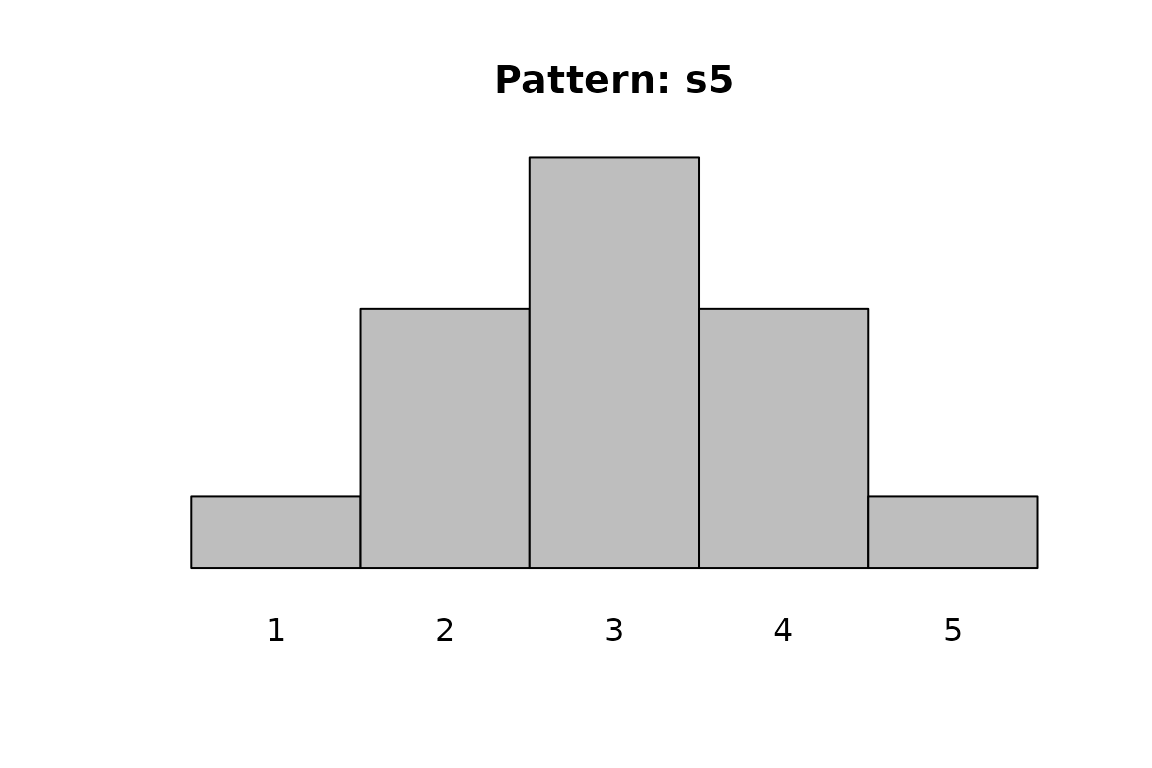 #> [1] -1.5 -0.5 0.5 1.5
plot_cut_pattern("s7")
#> [1] -1.5 -0.5 0.5 1.5
plot_cut_pattern("s7")
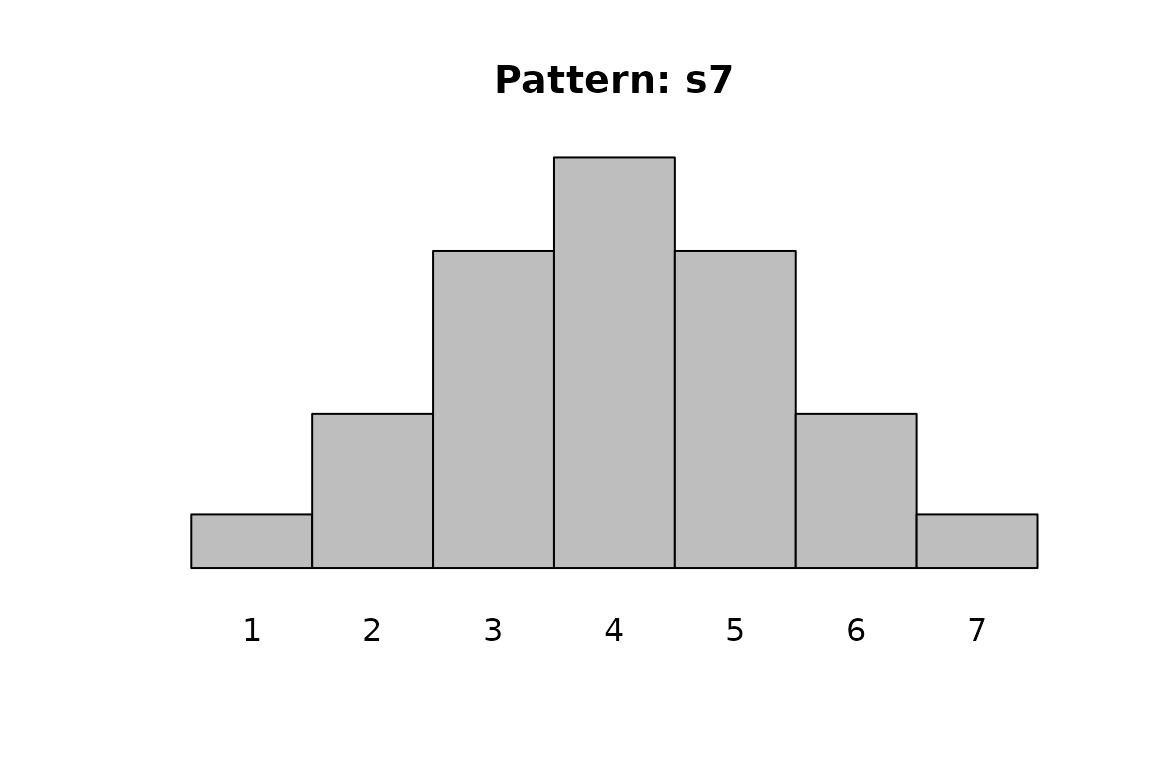 #> [1] -1.79 -1.07 -0.36 0.36 1.07 1.79
plot_cut_pattern("ma5")
#> [1] -1.79 -1.07 -0.36 0.36 1.07 1.79
plot_cut_pattern("ma5")
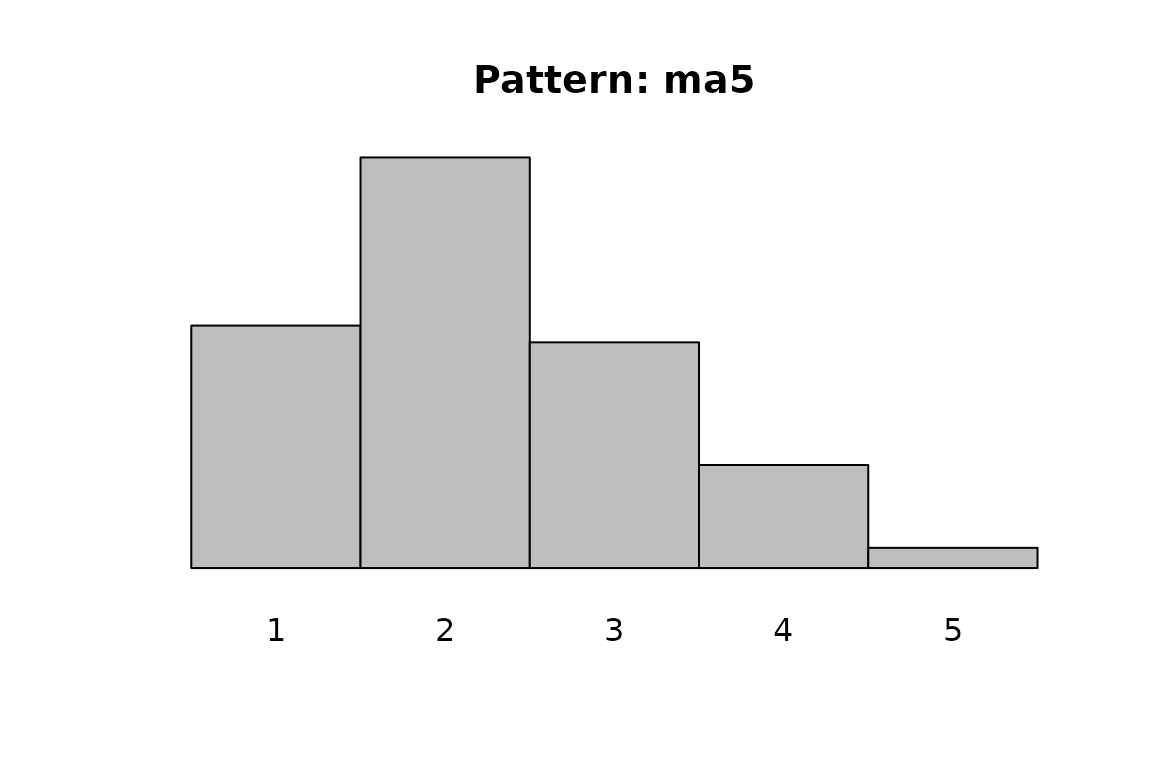 #> [1] -0.70 0.39 1.16 2.05
plot_cut_pattern("ea4")
#> [1] -0.70 0.39 1.16 2.05
plot_cut_pattern("ea4")
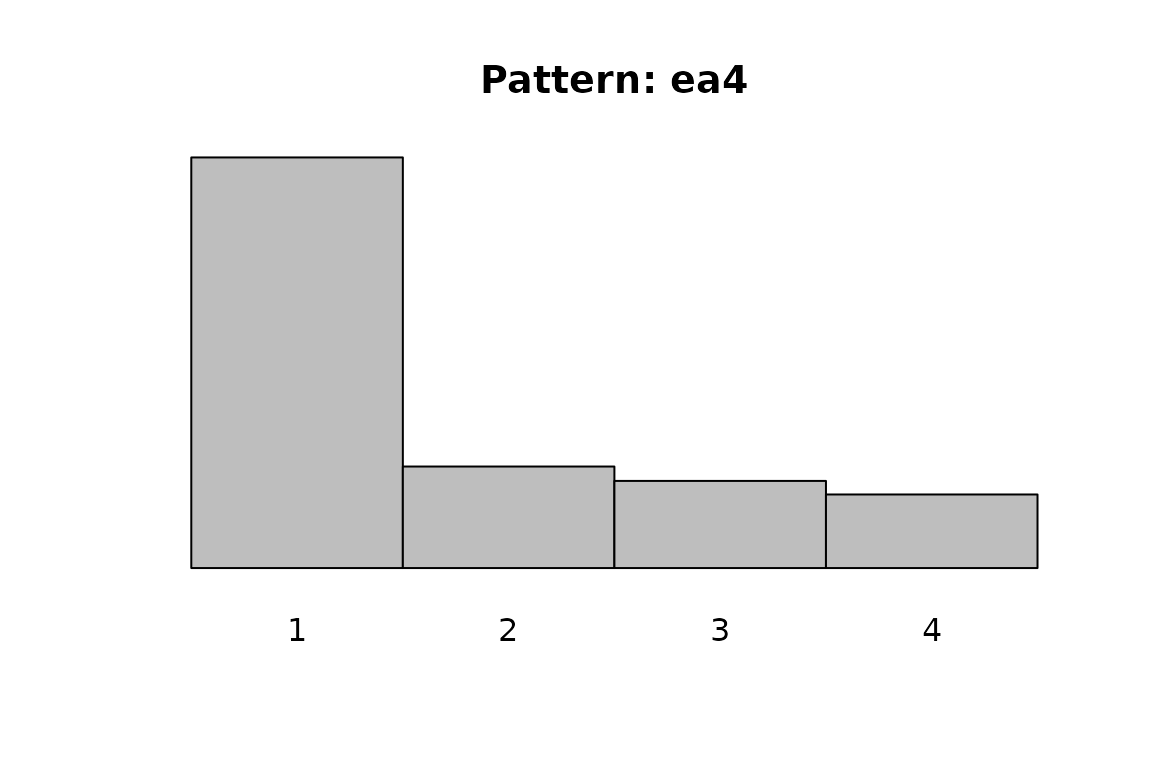 #> [1] 0.28 0.71 1.23
plot_cut_pattern("-ma5")
#> [1] 0.28 0.71 1.23
plot_cut_pattern("-ma5")
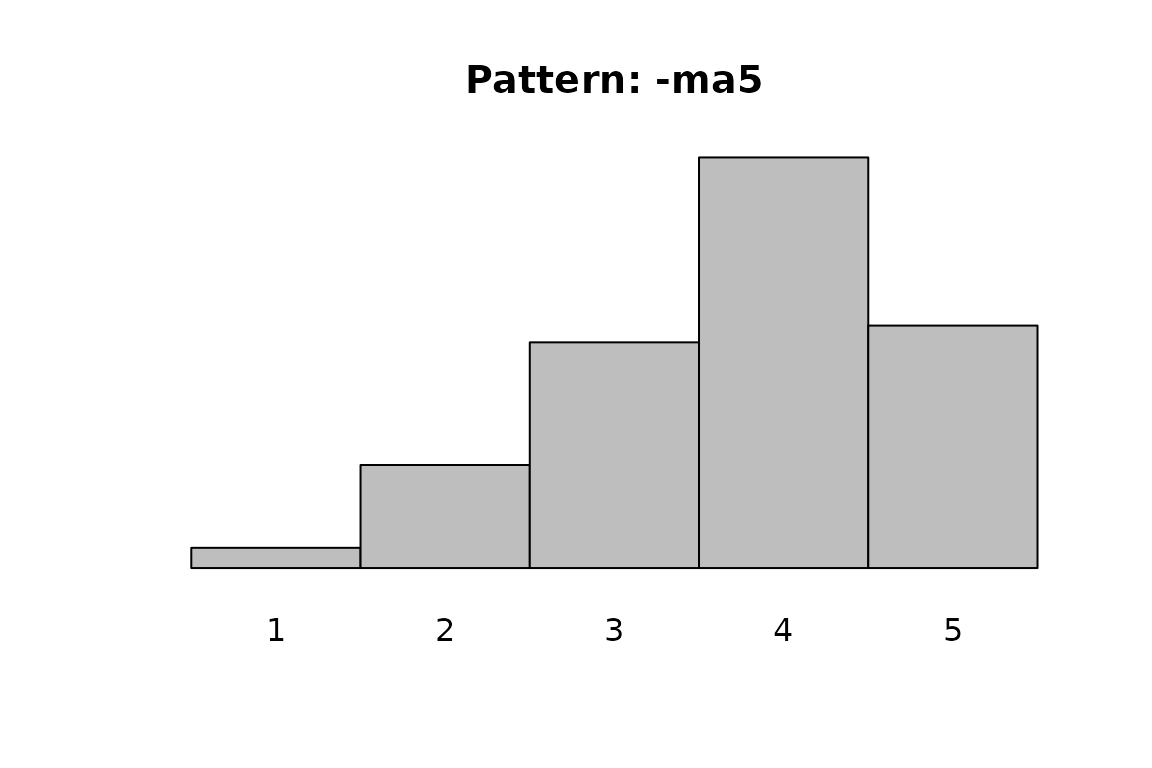 #> [1] -2.05 -1.16 -0.39 0.70
plot_cut_pattern("-ea7")
#> [1] -2.05 -1.16 -0.39 0.70
plot_cut_pattern("-ea7")
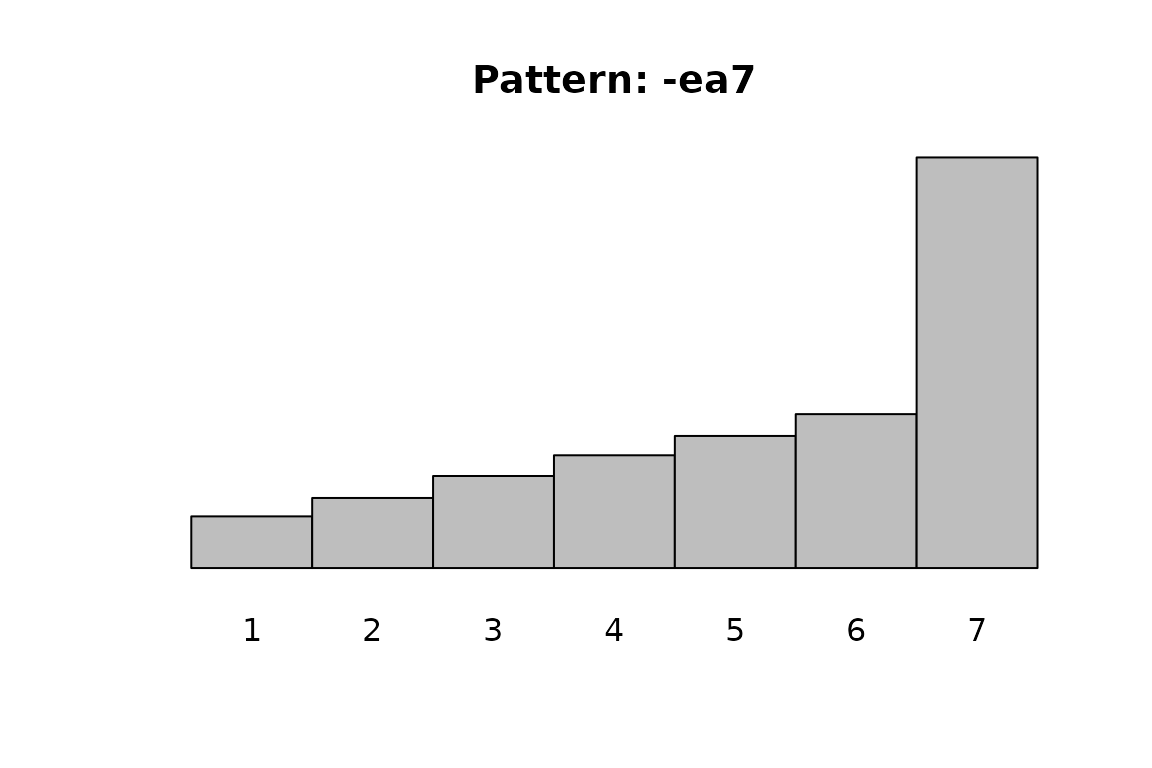 #> [1] -1.64 -1.18 -0.81 -0.47 -0.13 0.25